
If your WordPress website is not appearing on Google, the first and most important step is setting up Google Search Console. Many beginners publish content regularly but never get traffic simply because Google is not properly informed about their website.
Google Search Console helps Google understand your website structure, discover your pages, and index them correctly. Without this setup, your website may exist online, but Google may ignore it completely.
In this beginner-friendly guide, you will learn how to set up Google Search Console for WordPress step by step, verify your domain correctly, and prepare your site for Google indexing. This guide is fully aligned with the video tutorial embedded below.
What Is Google Search Console and Why It Is Important
Google Search Console is a free tool provided by Google that allows website owners to monitor and manage their site’s presence in Google Search results.
With Google Search Console, you can:
- Tell Google that your website exists
- Monitor which pages are indexed
- Check indexing and crawling errors
- See search performance and keywords
- Improve overall SEO foundation
For WordPress websites, Search Console is not optional — it is a basic requirement.
Domain Property vs URL Prefix (Which One to Use)
When adding your website to Google Search Console, Google gives you two options:
- Domain property
- URL prefix property
For WordPress websites, Domain Property is always recommended.
Domain property tracks all versions of your website including:
- http and https
- www and non-www
- subdomains
This ensures complete and accurate data without missing any version of your site. In this guide, we use Domain Property only.
How to Add Your WordPress Website to Google Search Console
Follow these steps carefully:
- Go to Google Search Console
- Click on “Add Property”
- Select Domain
- Enter your domain name (without https or www)
- Click Continue
Google will now ask you to verify domain ownership.
How to Verify Domain Ownership (DNS Method)
Domain verification is done through your domain’s DNS settings.
Steps:
- Google will provide a TXT record
- Copy the TXT record exactly
- Open your hosting or domain provider dashboard
- Go to DNS settings
- Add a new TXT record
- Paste the value provided by Google
- Save changes
After adding the record, return to Google Search Console and click Verify.
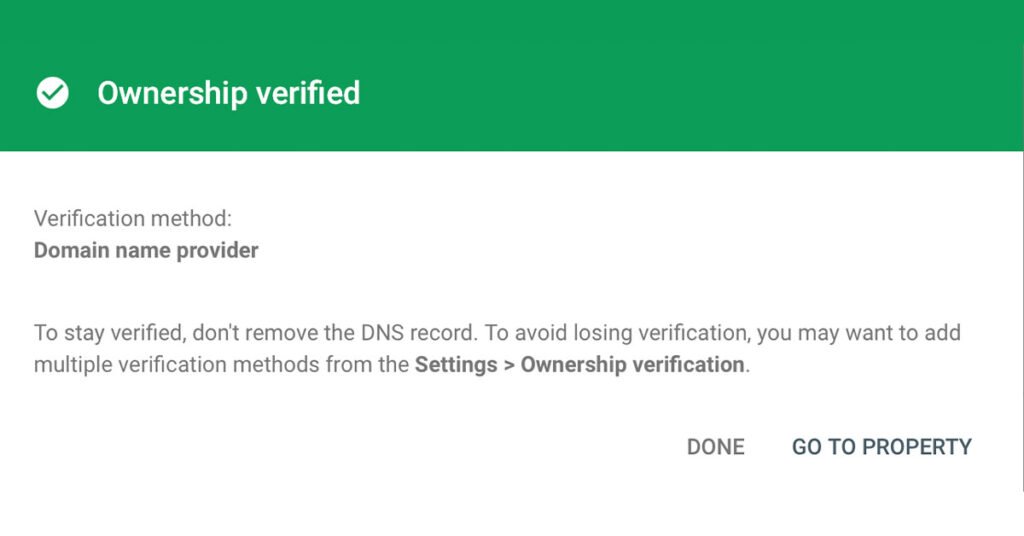
Once verified, Google will show an “Ownership verified” message. This verification is one-time only and does not require any WordPress plugin.
What Happens After Verification
After successful verification:
- Google starts discovering your website
- Pages begin entering the indexing process
- Search Console starts collecting data
This does not mean instant traffic. Indexing takes time, but without this step, indexing will never start.
Google Indexing Explained for Beginners
Indexing means Google has:
- Found your page
- Read your content
- Stored it in its database
Only indexed pages can appear in search results. Google Search Console allows you to monitor indexing status and fix issues if pages are not indexed.
Do You Need a Sitemap Right Now?
Even without a sitemap, Google can still discover your website after verification. However, a sitemap helps Google crawl your site faster and more efficiently.
Sitemap setup will be covered separately to avoid confusion and repetition. For now, focus on proper verification and indexing foundation.
Common Beginner Mistakes to Avoid
- Skipping domain verification
- Using URL Prefix instead of Domain property
- Expecting instant traffic after setup
- Making multiple Search Console accounts unnecessarily
- Ignoring indexing status
Avoid these mistakes and your SEO foundation will remain clean and strong.
Final Thoughts
Google Search Console is the backbone of WordPress SEO. Without it, your website has no direct communication with Google.
Once your website is verified and indexed, you can confidently move forward with:
- Sitemap submission
- SEO optimization
- Performance tracking
- Monetization strategies
Set it up once, set it up correctly, and build everything on top of it.