Introduction
Most beginners believe that SEO is impossible without installing plugins. This is completely wrong.
In reality, WordPress SEO without plugin is not only possible, but it is also the most important foundation for long-term Google ranking and AdSense approval.
In this guide, you will learn how to do proper WordPress SEO without using any SEO plugin, how Google actually reads your content, and which settings matter the most.
If you understand and apply this guide, SEO plugins will become optional tools — not a dependency.
What Google Really Looks At (Not Plugins)
Google does not see which plugin you are using.
Google only analyzes:
- Page structure
- Content clarity
- Headings
- Internal links
- Images and alt text
- User experience
SEO plugins only help you organize things. They do not rank your website.
That is why learning WordPress SEO without plugin is critical for beginners.
Site Title & Tagline (Hidden SEO Signal)
Your Site Title and Tagline help Google understand what your website is about.
Good Example:
WordPress Tutorials, Blogging & SEO Guides
Bad Example:
Just another WordPress site
Always keep your tagline clear, simple, and keyword-relevant.
SEO Friendly URL Structure (Slug)
Your URL should be short and readable.
Best Slug Example:
yourwebsite.com/wordpress-seo-without-plugin/
Avoid dates, numbers, or unnecessary words.
A clean slug improves click-through rate and helps Google understand your topic faster.
Categories Are SEO Structure (Not Just Design)
Categories are used by Google to understand your website’s main topics.
Best practices:
- Use only ONE category per post
- Category name should be meaningful
Example:
- Category: WordPress
Do not create unnecessary categories. Too many categories confuse search engines.
Tags – Use Carefully
Tags are not ranking factors.
Rules:
- Use 3–5 tags only
- Tags should be specific
- Never create new tags for every post
Too many tags can harm your site structure.
Image SEO Without Plugin (Very Important)
Images play a major role in WordPress SEO without plugin.
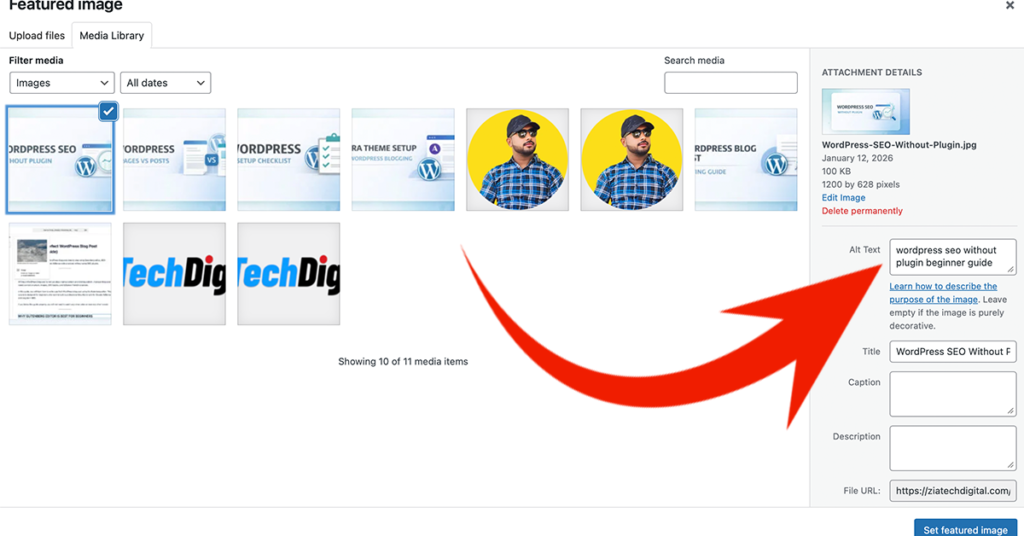
Image File Name
Before upload:
- ❌ IMG_1234.png
- ✅ wordpress-seo-without-plugin.png
Alt Text (Most Important)
Alt text should describe the image naturally.
Example Alt Text:
WordPress SEO without plugin explained step by step
Title & Description
- Title: Short
- Description: Optional
- Caption: Leave empty
Never stuff keywords in alt text.
How Many Images Should You Use?
Recommended:
- 1 image after every 300–400 words
- Do not overload images
- Images should explain content
Too many images can slow down your website.
Internal Linking (SEO Power Without Plugin)
Internal links help Google understand your content flow.
Always link at least one related post.
Internal Link Example:
If you miss important basic settings after installing WordPress, make sure you first follow the WordPress Setup Checklist After Installation.
This improves crawlability and topical authority.
External Links – Safe If Relevant
Linking to trusted sources increases credibility.
Example:
- WordPress.org
- YouTube tutorials
Do not overuse external links.
Meta Description Without SEO Plugin
Without SEO plugins, WordPress does not allow manual meta descriptions.
Solution:
- Write a strong introduction
- First 2–3 lines should summarize the post clearly
Google usually uses your introduction as the snippet.
Content Length & AdSense Rules
Google AdSense prefers:
- Original content
- Helpful information
- Clean layout
- Copyright-free images
Recommended length:
- 600–1200 words
Never copy content or images from Google search.
Final Publishing Checklist
Before publishing:
- Clean URL
- One category
- 3–5 tags
- Proper alt text
- Internal link added
- Mobile preview checked
Conclusion
Doing WordPress SEO without plugin builds a strong foundation for long-term growth.
Once your basics are correct, SEO plugins become optional tools instead of mandatory requirements.
Focus on structure, clarity, and user value — Google will follow.